Vision Plus Tab 8A
Brand: Vision Plus
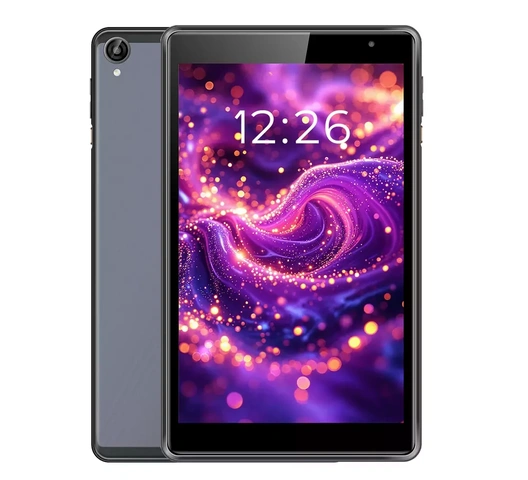
Vision Plus Tab 8A
Brand: Vision Plus
About this product
8-Inch Display – Compact screen delivers vibrant visuals ideal for streaming, reading, and browsing comfortably.
Slim Build – Thin profile and lightweight body make the tablet easy to carry throughout the day.
Dual Cameras – Rear and front-facing cameras support photography and video calling without extra accessories.
Android OS – Runs Android, giving access to a wide library of apps via the Google Play Store.
Touchscreen Interface – Responsive touch panel allows intuitive navigation for users of all ages.
Onboard Storage – Built-in storage accommodates apps, documents, photos, and media files for daily use.
Wireless Connectivity – Wi-Fi support keeps the tablet connected at home, in the office, or on public networks.
Rechargeable Battery – Built-in battery provides hours of use between charges for uninterrupted productivity.


Product specifications
| UPC | KIL037KILTAB |
|---|---|
| Model Number | Tab 8A |
| Colour | Grey |
| Compatibility | Android |
| Connectivity Standards | Wi-Fi |
| Connector Type | USB |
| Gross Weight Kg | 0.45 |
| Height Cm | 20.5 |
| Length Cm | 12.5 |
| Model | Tab 8A |
| Net Weight Kg | 0.35 |
| Power Source | Battery |
| Screen Size Inches | 8 |
| Size | 8 Inch |
| Style | Slate Grey |
| Supported Connectivity | Wi-Fi |
| Width Cm | 1 |
| Operating System | Android |
| Touchscreen | Yes |
| Operating System | Android |
| SKU | KIL037KILTAB |
Additional product information
| What's included | 1 x Vision Plus Tab 8A Tablet, 1 x USB Charging Cable, 1 x User Manual |
|---|---|
| Specific Uses | Web browsing, video streaming, e-reading, video calling, light productivity |
| Care & Maintenance | Clean screen with a soft, dry microfibre cloth. Avoid exposure to moisture and extreme temperatures. Use a protective case to prevent scratches. |
| Health & Safety Information | Keep out of reach of young children without supervision. Avoid prolonged screen exposure. Do not use while charging if device feels unusually warm. |
| Installation & Assembly Information | No assembly required. Charge fully before first use. Follow on-screen setup instructions to configure Android and connect to Wi-Fi. |